
Northline Supply / Synthetic business example
A monthly report you can refresh.
Add files in the agreed format, refresh in Windows Excel, and inspect accepted rows, exceptions and reconciliation before using the results.
Public v1.1.0 / Windows Excel with Power Query / first-run setup required
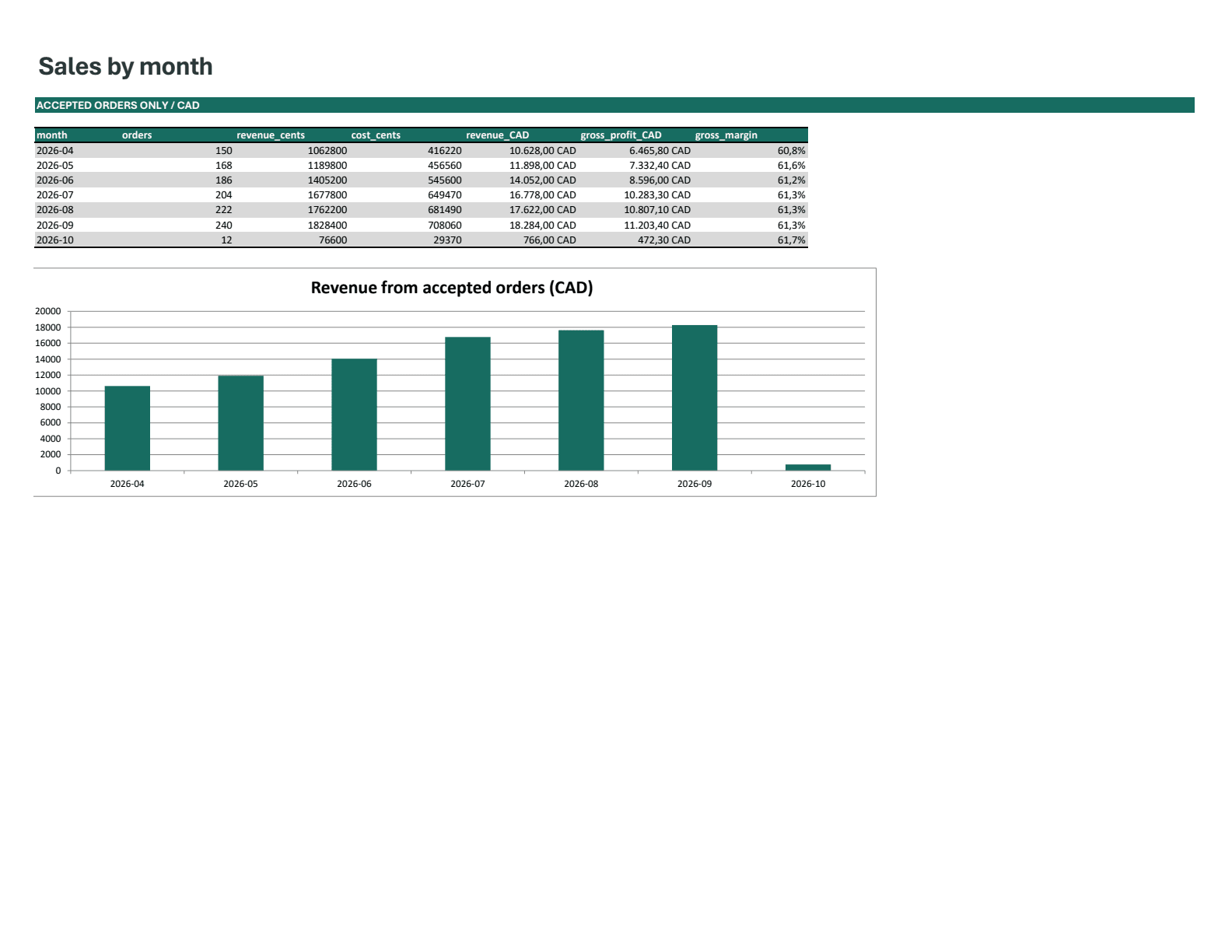
Preview: the native Excel monthly report using synthetic data. The browser demo is a separate implementation.
Downloads & setup
The problem
Monthly CSV files need consistent reporting rules. Duplicate IDs, unknown products and invalid values should be visible rather than silently changing the sales report.
What I did
I defined the workflow and reporting boundaries, directed the AI-assisted implementation, and reviewed native Excel checks against synthetic fixtures.
How it works
- Download the complete ZIP and extract the workbook with its fixtures folder. Cached synthetic results are visible immediately.
- Before refreshing, open Data > Queries & Connections > DataRoot > Edit > Advanced Editor. Replace SET_YOUR_FIXTURES_FOLDER with the absolute path to the extracted fixtures folder, in double quotes, then Close & Load.
- Use Data > Refresh All in Windows Excel with Power Query and wait for completion. Review both reconciliation differences and the Exceptions sheet; a failed refresh can leave stale cached values.
What you can verify
- The included exercise has 1,193 input rows, 1,182 accepted orders and 11 intentional exceptions. Accepted synthetic revenue is CAD 90,028.00.
- Native Windows Excel evidence records 135 rebuild checks, 106 relocated setup/refresh checks and 14 read-only checks of the exact public workbook.
- Zero row and valued-revenue reconciliation differences account for the fixture totals. Three invalid numeric rows remain unvalued, and every copy of a duplicate ID is excluded.
Project scope
Windows Excel 16.0 with Power Query was tested; Mac and Excel Online are unverified. Local file access and normal Excel privacy prompts apply. The chart covers seven fixture months. Large datasets and concurrent input editing are unverified. No live order or inventory connection is included. The browser demo and original simple workbook below are separate implementations. Real delivery requires agreed data rules and buyer acceptance.